


Description
FlashStation FS3410
Economical, high-performance data management solution for SMBs
Harness all-flash storage to speed up business workflows
- Storage : Supports 24 x 2.5” SATA SSDs
- Throughput : Over 356,500/129,400 iSCSI 4K random read/write IOPS
- Memory : 16 GB DDR4 ECC RDIMM, up to 128 GB
- Expandability : Optional 25/40GbE through PCIe 3.0 expansion
Powerful flash storage server
Combine all-flash performance with Synology systems’ ease of use and reliability. The FS3410 is designed to tackle scenarios that require high throughput and low latency.
Built for high reliability
The FS3410 is built to keep mission-critical data and services always accessible, enabling businesses to continue to perform even when disaster strikes.
Out-of-band (OOB) management
Simplify troubleshooting by managing powered-down devices remotely and accessing critical logs through a dedicated interface.
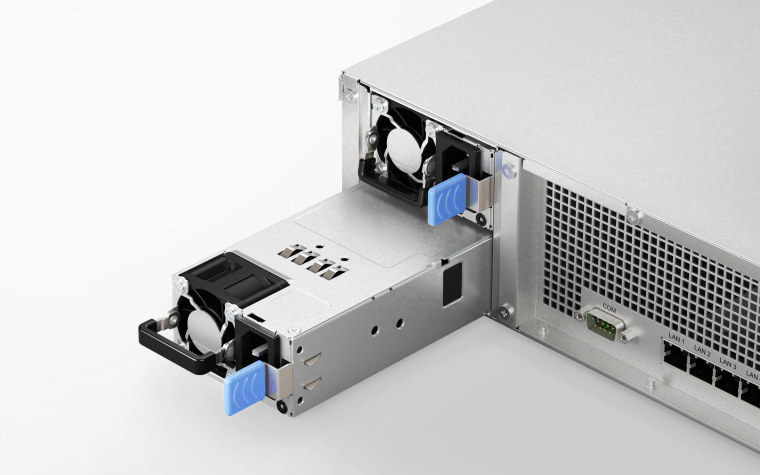
Dual power supply
Redundant PSU units reduce the possibility of power disruptions on a single distribution channel or PDU adversely impacting data and service availability.
Failover cluster
Pair two FS3410 units with Synology High Availability to enable automatic minute-level failover in the event of server failure or to minimize downtime when performing system updates or upgrades.

Powerful networking options
The FS3410 supports a wide range of networking interfaces, protocols, and configurations, whether you need fast sequential transfer, support for simultaneous connections, or high network redundancy.
Built-in fast connectivity
Two 10GbE RJ-45 ports and four Gigabit Ethernet ports allow for rapid transfer speeds right out of the box.
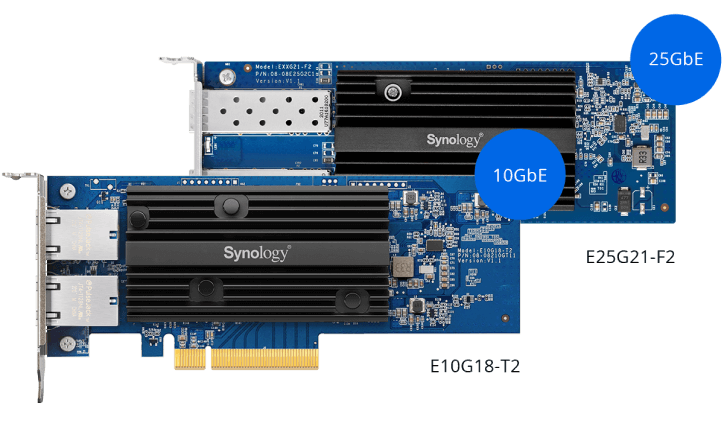
Support for 10/25/40GbE
Add up to 2 x 10/25/40GbE network interface cards using the 2 x PCIe 3.0 slots to enable lightning fast networking in minutes.2
Failover and network balancing
Bond multiple network interfaces with Link Aggregation to enable automatic network failover and load balancing.
Versatile data storage
The FS3410 fits perfectly in file server, block storage, or light application server roles that require high availability, reliability, and leading-edge storage technology.
VM storage & protection
Extremely fast IOPS performance combined with support for common virtualization platforms, iSCSI SAN service management, and extensive VM protection solutions make the FS3410 ideal for supporting and protecting VMs.
High-performance file serving & syncing
Leverage FS3410’s blistering speeds to provide low-latency access to massive files. Enhance the collaborative process with powerful and user friendly cross-site syncing capabilities.
Business application platform
Host cost-efficient business solutions, either through containers, virtual machines, or Synology DiskStation Manager (DSM)’s own solutions, including a powerful free backup suite, a versatile mail server, and a surveillance VMS with transparent licensing.
Get more with DiskStation Manager
Take advantage of a host of native productivity, management, and security solutions available in the web-based Synology DSM operating system.
Data Protection
Keep your business safe from data loss and minimize service downtime.
User Management
Manage user accounts and devices throughout your business with powerful directory services.
Security
Shield your Synology NAS from the most sophisticated threats with industry-leading security solutions.
File Management
Manage, sync, and share files from multiple devices through a centralized platform.
System Administration
Manage the health of your deployments and centrally administer updates with ease.
Public Cloud Integration
Back up and synchronize data easily between public cloud accounts and your NAS.
Synology has you covered
The FS3410 is backed by Synology's 5-year limited warranty,7 including technical support and hardware replacement services to maximize your return on investment and ensure continued high-quality performance.
Backed by Synology drives
Leverage high sustained performance and reliability with enterprise-grade drives designed specifically for Synology systems.6 Gain access to advanced features such as volume-wide data deduplication, lifetime analytics, and automatic firmware upgrades.


SPECIFICATIONS
Hardware Specifications
|
CPU |
CPU Model | Intel Xeon D-1541 |
|---|---|---|
| CPU Quantity | 1 | |
| CPU Architecture | 64-bit | |
| CPU Frequency | 8-core 2.1 (base) / 2.7 (turbo) GHz | |
| Hardware Encryption Engine (AES-NI) | ||
|
Memory |
System Memory | 16 GB DDR4 ECC RDIMM |
| Memory Module Pre-installed | 16 GB (16 GB x 1) | |
| Total Memory Slots | 4 | |
| Maximum Memory Capacity | 128 GB (32 GB x 4) | |
| Notes |
|
|
|
Storage |
Drive Bays | 24 |
| Compatible Drive Type* (See all supported drives) | 2.5" SATA SSD | |
| Hot Swappable Drive* | ||
| Notes |
|
|
|
External Ports |
RJ-45 1GbE LAN Port* | 4 (with Link Aggregation / Failover support) |
| RJ-45 10GbE LAN Port | 2 (with Link Aggregation / Failover support) | |
| Management LAN Port | 1 | |
| Max. number of LAN ports | 15 | |
| USB 3.2 Gen 1 Port* | 2 | |
| Notes |
|
|
|
PCIe |
PCIe Expansion | 2 x Gen3 x8 slots (x8 link) |
|
File System |
Internal Drives |
|
| External Drives |
|
|
| Notes | exFAT Access can be installed for free from Package Center in DSM 7.0. In DSM 6.2 or earlier versions, exFAT Access needs to be purchased in Package Center. | |
|
Appearance |
Form Factor (RU) | 2U |
| Size (Height x Width x Depth) | 88 mm x 482 mm x 724 mm | |
| Weight | 15.0 kg | |
| Rack Installation Support* | 4-post 19" rack (Synology Rail Kit – RKS-02) | |
| Notes | The rail kit is sold separately | |
|
Others |
System Fan | 80 mm x 80 mm x 4 pcs |
| Fan Speed Mode |
|
|
| Easy Replacement System Fan | ||
| Power Recovery | ||
| Noise Level* | 46.1 dB(A) | |
| Scheduled Power On / Off | ||
| Wake on LAN / WAN | ||
| Power Supply Unit / Adapter | 550 W | |
| Redundant Power Supply | ||
| AC Input Power Voltage | 100V to 240V AC | |
| Power Frequency | 50/60 Hz, Single Phase | |
| Power Consumption | 113.84 W (Access) | |
| British Thermal Unit | 388.70 BTU/hr (Access) | |
| Notes |
|
|
|
Temperature |
Operating Temperature | 0°C to 35°C (32°F to 95°F) |
| Storage Temperature | -20°C to 60°C (-5°F to 140°F) | |
| Relative Humidity | 5% to 95% RH | |
|
Certification |
|
|
|
Warranty |
5 Years | |
| Notes | The warranty period starts from the purchase date as stated on your purchase receipt. (Learn more) | |
|
Environment |
RoHS Compliant | |
|
Packaging Content |
|
|
|
Optional Accessories |
|
|
| Notes | Installing memory modules with differing capacities is not recommended. Check the Hardware Installation Guide of your Synology product for recommended memory configurations. | |
Software Specifications
|
DSM Specifications |
||
|---|---|---|
| Maximum Single Volume Size* |
|
|
| Maximum Internal Volume Number | 256 | |
| SSD Read / Write Cache (White Paper) | ||
| SSD TRIM | ||
| RAID Group | ||
| Supported RAID Type |
|
|
| RAID Migration |
|
|
| Volume Expansion with Larger HDDs |
|
|
| Volume Expansion by Adding a HDD |
|
|
| Global Hot Spare Supported RAID Type |
|
|
| Notes |
|
|
| File Protocol | SMB/AFP/NFS/FTP/WebDAV | |
| Maximum Concurrent SMB/AFP/FTP Connections | 4,000 | |
| Maximum Concurrent SMB/AFP/FTP Connections (with RAM expansion) | 10,000 | |
| Windows Access Control List (ACL) Integration | ||
| NFS Kerberos Authentication | ||
| Notes |
|
|
| Maximum Local User Accounts | 16,000 | |
| Maximum Local Groups | 512 | |
| Maximum Shared Folder | 512 | |
| Maximum Shared Folder Sync Tasks | 32 | |
| Maximum Hybrid Share Folders | 30 | |
| Synology High Availability | ||
| Syslog Events per Second | 3,000 | |
|
Virtualization |
VMware vSphere with VAAI | |
| Citrix Ready | ||
| OpenStack | ||
| Networking Protocols | SMB1 (CIFS), SMB2, SMB3, NFSv3, NFSv4, NFSv4.1, NFS Kerberized sessions, iSCSI, Fibre Channel, HTTP, HTTPs, FTP, SNMP, LDAP, CalDAV | |
| Supported Browsers |
|
|
| Supported Language | English, Deutsch, Français, Italiano, Español, Dansk, Norsk, Svenska, Nederlands, Русский, Polski, Magyar, Português do Brasil, Português Europeu, Türkçe, Český, ภาษาไทย, 日本語, 한국어, 繁體中文, 简体中文 | |
| Notes | For an updated list of supported browser versions, check the DSM Technical Specifications. | |
|
Add-on Packages view the complete package list |
||
|
Antivirus by McAfee (Trial) |
||
| Maximum Number of Concurrent Users | 500 | |
| Notes |
|
|
|
Document Viewer |
||
| Maximum iSCSI Target Number | 256 | |
| Maximum LUN | 512 | |
| LUN Clone/Snapshot, Windows ODX | ||
| Free Email Accounts | 5 (Licenses required for additional accounts) | |
| Maximum Number of Concurrent Users | 1,100 | |
| Maximum Server Performance | 4,471,000 emails per day, approx. 136 GB | |
| Notes |
|
|
| Maximum Snapshots per Shared Folder | 1,024 | |
| Maximum of System Snapshots | 65,536 | |
| Maximum IP cam (Licenses required) | 100 (including 2 Free License) (see all supported IP cameras) | |
| Total FPS (H.264) |
3000 FPS @ 720p (1280×720) 2800 FPS @ 1080p (1920×1080) 1200 FPS @ 3M (2048×1536) 700 FPS @ 5M (2591×1944) 500 FPS @ 4K (3840×2160) |
|
| Total FPS (H.265) |
3000 FPS @ 720p (1280×720) 3000 FPS @ 1080p (1920×1080) 2400 FPS @ 3M (2048×1536) 1300 FPS @ 5M (2591×1944) 800 FPS @ 4K (3840×2160) |
|
| Notes |
|
|
| Recommended Number of Concurrent Sync Clients | 2,000 (the number of connections that can be maintained when the recommended number of hosted files was reached) | |
| Recommended Number of Hosted Files | 50,000,000 (applies to files indexed or hosted by Synology Drive. For file access through other standard protocols, refer to the File Services section above) | |
| Notes |
|
|
| Maximum Users | 3,400 | |
| Notes |
|
|
| Recommended Virtual Machine Instances | 16 (Learn more) | |
| Recommended Virtual DSM Number (Licenses required) | 16 (including 1 Free License) | |
| Notes | The specifications vary depending on system configuration and memory size. | |
| Maximum Connections | 60 | |
Notes:
- Model specifications are subject to change without prior notice.
- The figures are based on Synology internal testing. Each performance test is done individually. No other services or applications are processed at the same time.
- The actual performance may be lower than lab testing figure due to differences in server configuration, deployment, and the number of active operations.
- If usage requirements exceed the specifications above, please contact our regional partners for professional advice.


